Best Roblox Analytics Tools Compared: BloxMetrics vs GameAnalytics vs PlayFab (2026)
A detailed comparison of the best analytics tools for Roblox developers in 2026. Compare features, pricing, ease of setup, and which tool is right for your game.
Sametcan Tasgiran
Founder & Developer at BloxMetrics
TL;DR: For most Roblox developers, BloxMetrics is the best analytics tool — purpose-built for Roblox with a 2-minute setup, AI insights, and benchmarks from 10,000+ games. GameAnalytics is better if you develop across multiple platforms. PlayFab suits developers who need a full backend, not just analytics. Building custom only makes sense for large studios with dedicated data teams.
Why You Need Analytics for Your Roblox Game
If you're developing a Roblox game without analytics, you're building in the dark. You can't improve what you can't measure.
The best analytics tools for Roblox developers in 2026 are BloxMetrics, GameAnalytics, and PlayFab. BloxMetrics is purpose-built exclusively for Roblox with a 2-minute SDK setup, AI-powered insights, and industry benchmarks from 10,000+ games. GameAnalytics is a general-purpose game analytics platform that supports Roblox among other engines, with setup taking 10-15 minutes. PlayFab (Microsoft) is a full backend-as-a-service with basic analytics, requiring 30+ minutes of integration. For most Roblox developers, BloxMetrics offers the best combination of Roblox-specific features, ease of setup, and actionable AI insights at a competitive price point (free tier available, Pro at $19/month). GameAnalytics is better suited for developers working across multiple game platforms, while PlayFab excels when you need a complete backend solution beyond analytics.
Analytics tell you:
- Where players drop off in your game
- Which features players actually use
- Whether your monetization is working
- How your game compares to competitors
- What to build next
In 2026, there are several options for Roblox game analytics. Let's compare the most popular ones.
The Contenders
1. BloxMetrics
Built specifically for Roblox. BloxMetrics is a purpose-built analytics platform designed exclusively for Roblox game developers.
Key Features:
- Real-time player session tracking
- D1/D7/D30 retention dashboards
- Revenue and ARPPU analytics
- AI-powered insights (tells you exactly what to improve)
- Industry benchmarks from 10,000+ Roblox games
- Competitor tracking
- Custom event funnels
- Roblox-native Lua SDK
Pricing:
- Free: 1 game, basic stats, 7-day retention
- Pro ($19/mo): 5 games, AI insights, 90-day retention
- Business ($49/mo): Unlimited games, API access, 1-year retention
Setup Time: 2 minutes — drop in a single Lua module
Best For: Roblox developers who want Roblox-specific analytics with AI insights and industry benchmarks, without the complexity of general-purpose tools.
2. [GameAnalytics](https://gameanalytics.com)
General game analytics platform that supports Roblox among many other platforms.
Key Features:
- Player session tracking
- Retention metrics
- Revenue tracking
- Custom events
- A/B testing
- Multi-platform support (Unity, Unreal, Roblox, etc.)
Pricing:
- Free tier available
- Pro plans start at $30/mo
Setup Time: 10-15 minutes — requires more configuration
Best For: Developers who work across multiple game platforms and want one tool for everything.
3. [PlayFab](https://playfab.com) (Microsoft)
Backend-as-a-service with analytics built in. Part of the Microsoft/Azure ecosystem.
Key Features:
- Player data management
- LiveOps tools
- Basic analytics dashboards
- Economy management
- Leaderboards
- Multiplayer services
Pricing:
- Free tier with limits
- Pay-as-you-go scaling
Setup Time: 30+ minutes — significant integration work
Best For: Developers who need a full backend solution, not just analytics.
4. Custom [DataStore](https://create.roblox.com/docs/cloud-services/data-stores) Solution
Build it yourself using Roblox DataStores and external databases.
Key Features:
- Complete control over data
- No third-party dependencies
- Customizable to your exact needs
Pricing:
- Free (but costs developer time)
Setup Time: Days to weeks of development
Best For: Large studios with dedicated data engineering teams.
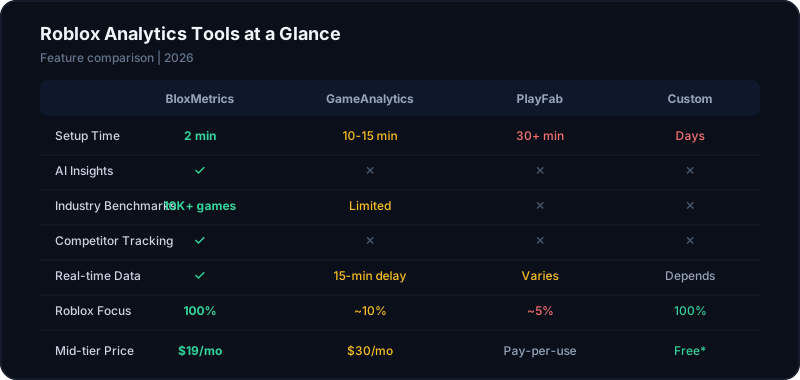
Feature Comparison
| Feature | BloxMetrics | GameAnalytics | PlayFab | Custom |
|---|---|---|---|---|
| Roblox-native SDK | Yes | Yes | Partial | N/A |
| Setup time | 2 min | 10-15 min | 30+ min | Days |
| D1/D7/D30 retention | Yes | Yes | Basic | Build it |
| Revenue tracking | Yes | Yes | Yes | Build it |
| AI insights | Yes | No | No | No |
| Industry benchmarks | Yes | Limited | No | No |
| Competitor tracking | Yes | No | No | No |
| Custom event funnels | Yes | Yes | Basic | Build it |
| Real-time data | Yes | 15-min delay | Varies | Depends |
| Roblox-specific focus | 100% | ~10% | ~5% | 100% |
| Free tier | Yes | Yes | Yes | Yes |
What Matters Most for Roblox Developers
1. Roblox-Specific Context
Generic analytics tools give you raw numbers. Roblox-specific tools give you context. Knowing your D1 retention is 12% is useful, but knowing that puts you in the top 25% for your genre is actionable.
BloxMetrics provides industry benchmarks segmented by genre and session tier, so you always know where you stand relative to similar games.
2. Speed of Setup
Most indie Roblox developers are solo or small teams. They don't have time to spend days integrating analytics. The faster the setup, the more likely you'll actually use it.
BloxMetrics wins here with a 2-minute, single-module setup. GameAnalytics takes 10-15 minutes. PlayFab requires significant integration work.
3. Actionable Insights
Data is only useful if you know what to do with it. This is where AI-powered insights make a difference. Instead of staring at charts trying to figure out why retention dropped, BloxMetrics tells you: "Your D1 retention dropped 15% this week. Players are leaving during the tutorial — consider shortening Step 3 where 40% of new players quit."
4. Cost
For indie developers, every dollar matters. Here's the real cost comparison:
| Plan | BloxMetrics | GameAnalytics | PlayFab |
|---|---|---|---|
| Free | 1 game | Limited | Limited |
| Mid-tier | $19/mo | $30/mo | Pay-per-use |
| Full features | $49/mo | $50+/mo | Variable |
5. Competitor Intelligence
Only BloxMetrics offers competitor tracking out of the box. See how your competitors' metrics change over time, what updates they ship, and how your game stacks up.
Our Recommendation
For most Roblox developers, BloxMetrics is the best choice because:
- 1It's built exclusively for Roblox — every feature is designed for Roblox use cases
- 2Setup takes 2 minutes — you'll actually use it
- 3AI insights tell you what to do, not just what happened
- 4Industry benchmarks give your data context
- 5Pricing is fair for indie developers
Choose GameAnalytics if you develop for multiple platforms and want one analytics tool for everything.
Choose PlayFab if you need a full backend solution with economy management and multiplayer services — not just analytics.
Build custom if you're a large studio with a data team and very specific requirements that no off-the-shelf tool can meet.
Getting Started
Ready to start tracking your Roblox game's metrics? Sign up for BloxMetrics free — no credit card required. You'll have analytics running in your game within 5 minutes.
Track your Roblox game metrics today
Set up BloxMetrics in 2 minutes. Get retention, revenue, and player analytics — free.
Start Free